[Streamlit] Streamlit 설치 및 데모 실행 (Ubuntu24.02)

2025. 6. 29. 10:10·프로그래밍/Streamlit

1. 설치 환경

- Ubuntu 24.02

- Python 3.12


2. 설치 방법

- 아래와 같이 간단하게 pip install 을 이용하여 패키지를 설치

pip install streamlit


3. Streamlit 실행

- streamlit이 정상적으로 설치 되면, 아래와 같은 커맨드로 데모 사이트를 실행 할 수 있음

streamlit hello


- 위의 커맨드를 실행 시 이메일 주소를 묻는데 자주 쓰는 이메일을 입력하면 됩니다.
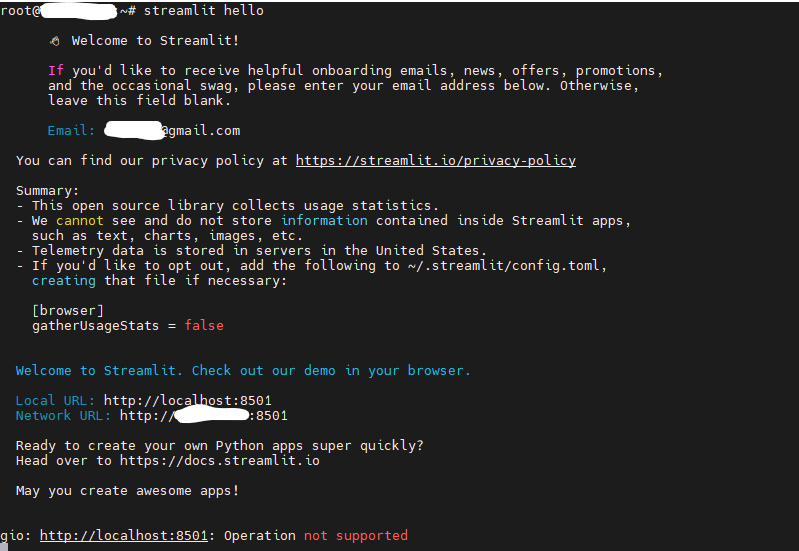
 

- 로컬 서버에서 실행하는 경우 http://localhost:5801 로, 외부 클라우드 서버에서 실행 시 http://public IP:5801 접속시 아래와 같은 결과를 볼 수 있습니다.


저작자표시 (새창열림)

'프로그래밍 > Streamlit' 카테고리의 다른 글

[Streamlit] nginx를 이용한 Streamlit 서비스 포트 포워딩  (0) 2025.06.30
[Streamlit] AxiosError: request failed with status code 413  (0) 2025.01.01
[Streamlit] 테마 (다크모드/라이트모드) 변경하기  (0) 2024.12.29
'프로그래밍/Streamlit' 카테고리의 다른 글
  • [Streamlit] nginx를 이용한 Streamlit 서비스 포트 포워딩
  • [Streamlit] AxiosError: request failed with status code 413
  • [Streamlit] 테마 (다크모드/라이트모드) 변경하기
써니의 연습장
써니의 연습장
IT, AI, 일상, 경제 등..
  • 써니의 연습장
    써니의 연습장
    써니의 연습장
  • 전체
    오늘
    어제
    • 분류 전체보기 (25)
      • 프로그래밍 (25)
        • Python (0)
        • AI (3)
        • DataBase (0)
        • Streamlit (4)
        • Pandas (0)
        • Tensorflow (1)
        • Etc (6)
        • PostgreSql (5)
        • Ubuntu (1)
        • Nginx (2)
        • Node.js (2)
        • Git (1)
        • Backend (0)
      • 게임 (0)
      • 골프 (0)
      • 리뷰 (0)
  • 블로그 메뉴

    • 홈
    • 프로그래밍
    • 게임
    • 골프
    • 리뷰
  • 링크

  • 공지사항

  • 인기 글

  • 태그

    PIP
    ubuntu
    theme
    centos7
    Streamlit
    protoc #protocolbuffers
    certbot
    Github #Clone
    ubuntu #port forwarding #우분투 #포트 포워딩
    Python
    python3.12
    cudart64_110.dll
    PostgreSQL
    ncp
    cvat
    Python #Pillow
    Lets Encrypt
    nginx
    python3.10
    ubuntu22.4
    sam
  • 최근 댓글

  • 최근 글

  • hELLO· Designed By정상우.v4.10.3
써니의 연습장
[Streamlit] Streamlit 설치 및 데모 실행 (Ubuntu24.02)
상단으로

티스토리툴바